> For the complete documentation index, see [llms.txt](https://docs.pandium.com/llms.txt). Markdown versions of documentation pages are available by appending `.md` to page URLs; this page is available as [Markdown](https://docs.pandium.com/getting-started/integration-patterns.md).
# Integration Patterns
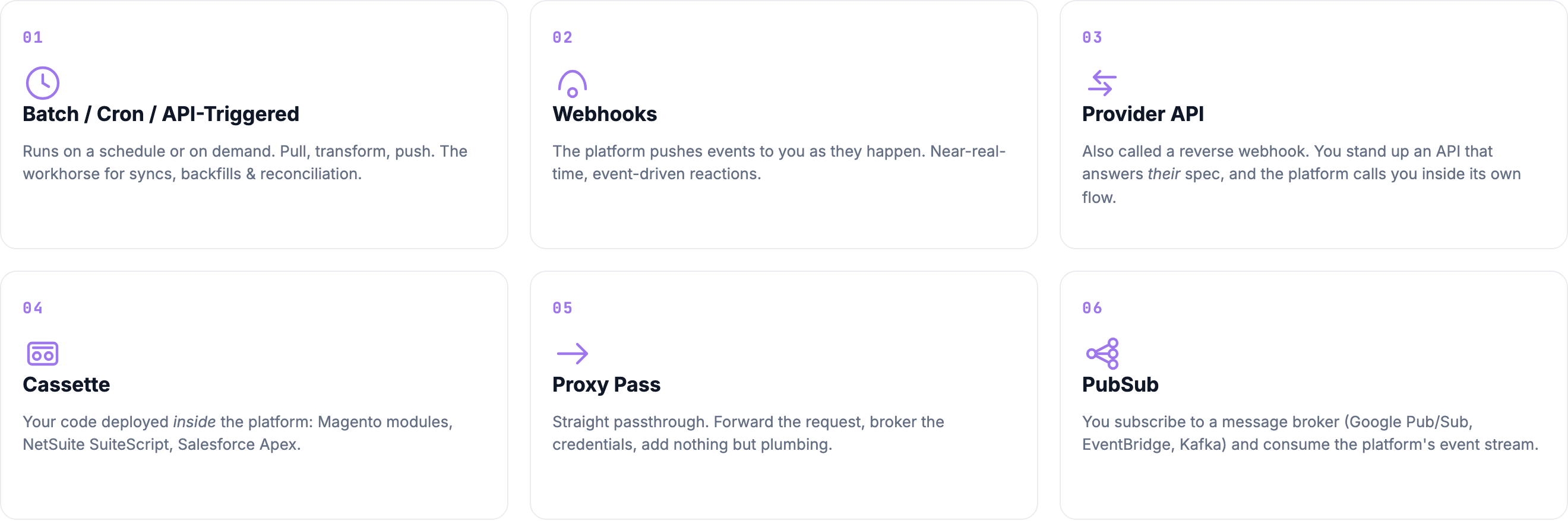
The six integration patterns behind every Pandium integration: batch syncs, webhooks, provider APIs, cassettes, proxy pass, and pub/sub. Learn what each one is and when to use it.
Every integration comes down to one decision: who calls whom, and when. That choice shapes almost everything else about how the integration behaves, including its latency, its failure modes, and how much infrastructure it needs to keep running.
Across years of building customer-facing integrations, we have found that nearly everything we are asked to build fits one of six patterns. Five of them come up constantly. The sixth is rare enough that most teams will never need it, but it is worth knowing about.
This section covers each pattern: what it is, how Pandium supports it, and when to reach for it instead of one of the others.
## The six patterns
| Pattern | What it is | When to use it |
| ------------------------------------------------------------------------------------------------------- | ---------------------------------------------------------------------------------------------- | ------------------------------------------------------------------------------------------------------ |
| [Batch and API-Triggered Syncs](/getting-started/integration-patterns/batch-and-api-triggered-syncs.md) | A job runs on a schedule, a button click, or an API call, and pulls or pushes whatever changed | Anything from a once-a-minute near-real-time sync to a nightly run, and you want something that scales |
| [Webhooks](/getting-started/integration-patterns/webhooks.md) | A third-party system posts events to Pandium in real time as they happen | Volume is manageable and you need a fast reaction to a single event |
| [Provider API (Reverse Webhook)](/getting-started/integration-patterns/provider-api.md) | Pandium hosts a service that answers a third-party platform's spec, and the platform calls it | The platform requires it and hands you the spec, such as the BigCommerce Tax Provider API |
| [Cassettes](/getting-started/integration-patterns/cassettes.md) | Your code runs inside the third party's own runtime (Magento, NetSuite, Salesforce, Shopify) | The platform gives no other way in, or you need to live inside its UI |
| [Proxy Pass](/getting-started/integration-patterns/proxy-pass.md) | A tenant's authenticated connector passes a call straight through to the third-party API | You need one thing, right now, and a full sync would be overkill |
| [PubSub](/getting-started/integration-patterns/pubsub.md) | You subscribe to a message broker and consume the platform's event stream | Volume is high and you cannot afford lost or duplicated events |
## Choosing a pattern
Two of these, provider APIs and cassettes, usually are not a choice at all. The platform on the other end dictates them, and the work is building to its spec rather than picking between options.
For everything else, batch is the default. It has the fewest moving parts to keep running, and it covers the large majority of what integrations actually need. Schedules run down to the minute, so if your logic is fast, batch is also a perfectly good semi-real-time pattern. See [Run Triggers](/getting-started/anatomy-of-an-integration/run-triggers.md) for how scheduled, manual, webhook, and API triggers all work on the platform today.
Webhooks are the next step when even a one-minute schedule is not fast enough, or when polling for changes is too expensive. Most real-time integrations still pair a webhook with a scheduled batch run as a backstop, because a missed event is always possible.
Proxy pass looks appealing because it is the cheapest pattern to stand up, but simple and scalable solve different problems. Know which one you actually need before you commit to it.
Real products mix them. A typical shape is webhooks for the moment-to-moment changes, a nightly batch run for reconciliation and backfill, and a proxy call wherever a straight passthrough is enough.
## Make it idempotent
Whatever pattern you pick, write the integration so that processing the same record or event twice produces the same result. Every pattern on this list will hand you duplicates at some point: a rerun, a retried webhook, a replayed message, an overlapping window. An idempotent integration shrugs those off. One that is not will create duplicate records, and you will spend your time cleaning up instead of building.
If you are still comparing integration platforms more broadly, see [our guide to evaluating an embedded iPaaS](https://www.pandium.com/blogs/best-embedded-ipaas-solutions-complete-guide).
---
# Agent Instructions
This documentation is published with GitBook. GitBook is the documentation platform designed so that both humans and AI agents can read, navigate, and reason over technical content effectively. Learn more at gitbook.com.
## Querying This Documentation
If you need additional information that is not directly available in this page, you can query the documentation by asking a question.
Perform an HTTP GET request on the following URL with the `ask` and `goal` query parameters:
```
GET https://docs.pandium.com/getting-started/integration-patterns.md?ask=&goal=
```
`ask` is the immediate question: it should be specific, self-contained, and written in natural language.
`goal` is what the user is ultimately trying to achieve, the reason they need the answer. Sharing it helps GitBook give you a better, more relevant answer. A goal is most helpful when it describes the outcome the user wants rather than restating the question. For example, with `ask=how do I create an API token`, a goal like `automate deployments from our CI pipeline` lets GitBook tailor the answer to that use case.
The response will contain a direct answer to the question and relevant excerpts and sources from the documentation.
Use this mechanism when the answer is not explicitly present in the current page, you need clarification or additional context, or you want to retrieve related documentation sections.