> For the complete documentation index, see [llms.txt](https://docs.pandium.com/llms.txt). Markdown versions of documentation pages are available by appending `.md` to page URLs; this page is available as [Markdown](https://docs.pandium.com/marketplaces/listing-in-external-marketplaces/shopify-marketplace.md).
# Shopify Marketplace
Learn how to list and manage your Pandium-powered integration on the Shopify Marketplace, including configuration steps, listing requirements, and best practices for a successful app listing.
When submitting your app to the Shopify marketplace, you'll need to include several critical values during the app creation process in your [Shopify Dev Portal](https://dev.shopify.com/).
### 1. Scopes
Please note, the scopes you select during app creation determine which webhooks you can use. These scopes also need to match when you [provision](https://docs.pandium.com/integration-hub/pandium-quick-start#creating-an-internal-integration) the Shopify connector in Pandium.
### 2. Redirect URLs
You would use the following URLs:
* **Production:**
* **Staging:**
You also need to make sure you include your Landing URL in your redirect URLs.
### 3. App URLs
The OAuth Installation URL initiates the connection flow when users install your app from the Shopify marketplace. This URL is configured in the Shopify Dev Portal and is called by Shopify when a user installs your app.
{% hint style="warning" %}
**Important:** This URL cannot be accessed directly. It must be called by Shopify, which includes HMAC signature verification parameters. Accessing this URL directly will result in a 401 Unauthorized error.
{% endhint %}
**Base URL Format**
Choose the appropriate base URL for your environment:
**Sandbox Environment:**
{% code overflow="wrap" %}
```
https://exmart.sandbox.pandium.com/v1/shopify/auth//
```
{% endcode %}
**Production Environment:**
{% code overflow="wrap" %}
```
https://exmart.pandium.io/v1/shopify/auth//
```
{% endcode %}
Replace `` and `` with your specific values.
#### Query Parameters
Add the following query parameters to your App URL:
**landing\_url** (required)
* Specifies where users are redirected after completing the installation
* Pandium will append additional query parameters to handle tenant linking
* Format: `?landing_url=`
* Example: `?landing_url=https://gwtech.io..pandium.com/integrations`
{% hint style="info" %}
Reminder: Please include your landing URL in your redirect URLs
{% endhint %}
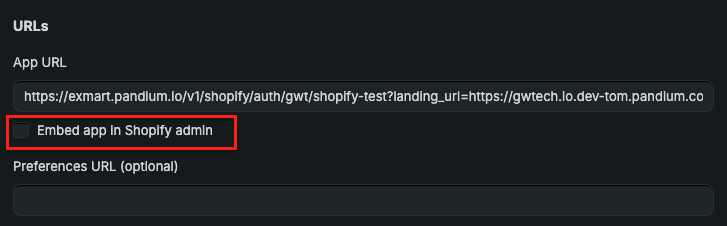
### 4. Uncheck "Embedded App in Shopify Admin"
At this time, Pandium doesn't doesn't support this feaure, so you need to make sure this is unchecked before submitting your application.
### Uninstalling Your Shopify App
By default, we auto subscribe each shop that installs the integration to the Shopify uninstall webhooks. As a result, when you uninstall it from the Shopify dashboard, this will uninstall/archive the corresponding tenant in Pandium.\
\
When you uninstall your tenant from your Pandium marketplace, this will result in the app being uninstalled from the Shopify Dashboard.
### Need Help?
If you encounter issues during the listing process, please feel free to contact your Pandium Technical Account Manager for assistance.
---
# Agent Instructions
This documentation is published with GitBook. GitBook is the documentation platform designed so that both humans and AI agents can read, navigate, and reason over technical content effectively. Learn more at gitbook.com.
## Querying This Documentation
If you need additional information that is not directly available in this page, you can query the documentation by asking a question.
Perform an HTTP GET request on the following URL with the `ask` and `goal` query parameters:
```
GET https://docs.pandium.com/marketplaces/listing-in-external-marketplaces/shopify-marketplace.md?ask=&goal=
```
`ask` is the immediate question: it should be specific, self-contained, and written in natural language.
`goal` is what the user is ultimately trying to achieve, the reason they need the answer. Sharing it helps GitBook give you a better, more relevant answer. A goal is most helpful when it describes the outcome the user wants rather than restating the question. For example, with `ask=how do I create an API token`, a goal like `automate deployments from our CI pipeline` lets GitBook tailor the answer to that use case.
The response will contain a direct answer to the question and relevant excerpts and sources from the documentation.
Use this mechanism when the answer is not explicitly present in the current page, you need clarification or additional context, or you want to retrieve related documentation sections.